Vertical exaggeration for 3D printed terrain maps: height, base and resolution
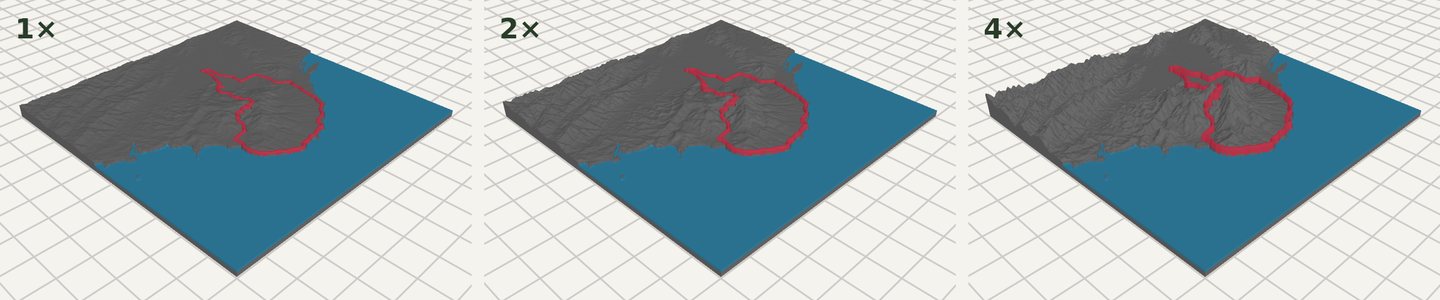
How to set vertical exaggeration, print size, base height and grid resolution for a 3D printed terrain map, with the formula for relief height and the same model at 1×, 2× and 4×.
In short
Open Terrain Detail in the TrailMark3D workspace. Vertical Exaggeration multiplies the height of the relief (1× is true to scale) and updates the 3D model live; Print Size sets the longest side, 20 to 250 mm; Base Height sets the solid base under the terrain; Grid Resolution sets how many elevation points the surface has. Relief in mm = elevation range in m × print size in mm ÷ area width in m × exaggeration. The Free plan has Standard resolution; Pro sets a finer grid from your print size and nozzle.
Real landscapes are flat. A 1,000 m mountain on a 10 km wide map is a 1:10 bump, and at 100 mm across it prints only 10 mm tall. That is why almost every 3D printed terrain map stretches the heights. TrailMark3D's Terrain Detail section holds the four settings that decide how the relief looks: vertical exaggeration, print size, base height and grid resolution. This guide explains each one, gives the formula to work out the printed height, and shows the same model at 1×, 2× and 4×.
Open Terrain Detail on the sample trail
Open Terrain Detail
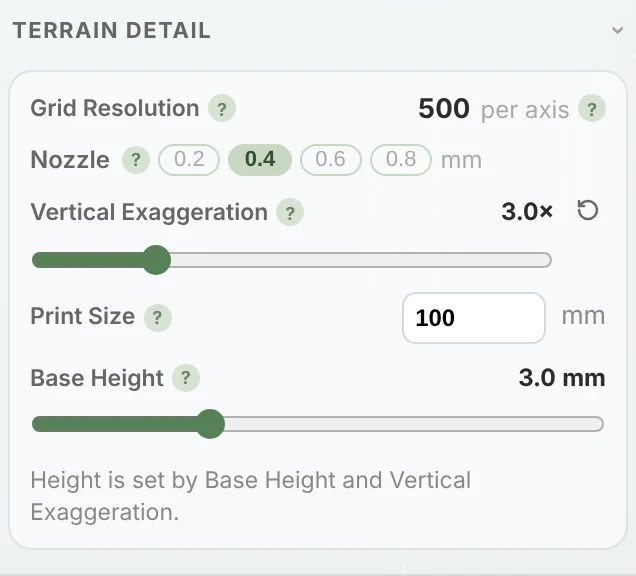
Upload a GPX or search a place, then open Terrain Detail at the top of the settings panel. Its summary line shows the current grid, height and base, for example "250×250 grid · 3.0× height · 3.0 mm base". The link above opens it on the sample trail, in the hills of Yangmingshan above Taipei.
Set the vertical exaggeration
Vertical Exaggeration multiplies every height in the model. At 1× the terrain is true to scale; at 3× every slope is three times as steep. The slider goes from 1× to 10× in steps of 0.5. Once a model is generated the setting carries a Live badge: moving it reshapes the 3D model straight away, without generating again, so you can compare before you download.
A good starting point:
- Big mountains (the Alps, the Rockies, a volcano): 1× to 1.5×. They already have lots of relief.
- Hills and valleys (a day hike, a trail run): 2× to 3×.
- Gentle country (a city, a coastline, a river valley, a marathon route): 4× to 6×, or more for very flat places.
Work out the printed height
The relief scales with the map. Its height in millimeters is the elevation range of the area in meters, times the print size in millimeters divided by the area's width in meters, times the exaggeration:
For example, 600 m of relief over a 5 km wide area, printed at 100 mm: 600 × 100 ÷ 5,000 = 12 mm at 1×, and 36 mm at 3×. Add the base height to get the total. After you generate, Print Size shows the real result, as "Built 100 × 100 mm, 39 mm tall".
Choose the print size and base height
Print Size is the length of the model's longest side, from 20 to 250 mm, 100 mm by default. It scales the relief with the footprint, so the terrain stays in proportion, and it is applied when you generate. Base Height is the solid layer under the lowest point of the terrain, from 0 to 10 mm, 3 mm by default. A thicker base makes the model sturdier and gives water and slots room to sink in; a thin one saves filament and print time.
Choose the resolution
Grid Resolution is how many elevation points the surface has along each side. More points mean sharper ridges and smoother slopes, and bigger files. Signed out, models use Basic (70 × 70). A free account uses Standard, 250 × 250, one point per 0.4 mm nozzle width at the default 100 mm print. On Pro the grid is set for you from your print size and your Nozzle (0.2, 0.4, 0.6 or 0.8 mm), up to 625 × 625, so a 250 mm print gets as much detail as your printer can lay down.
Generate, compare and download
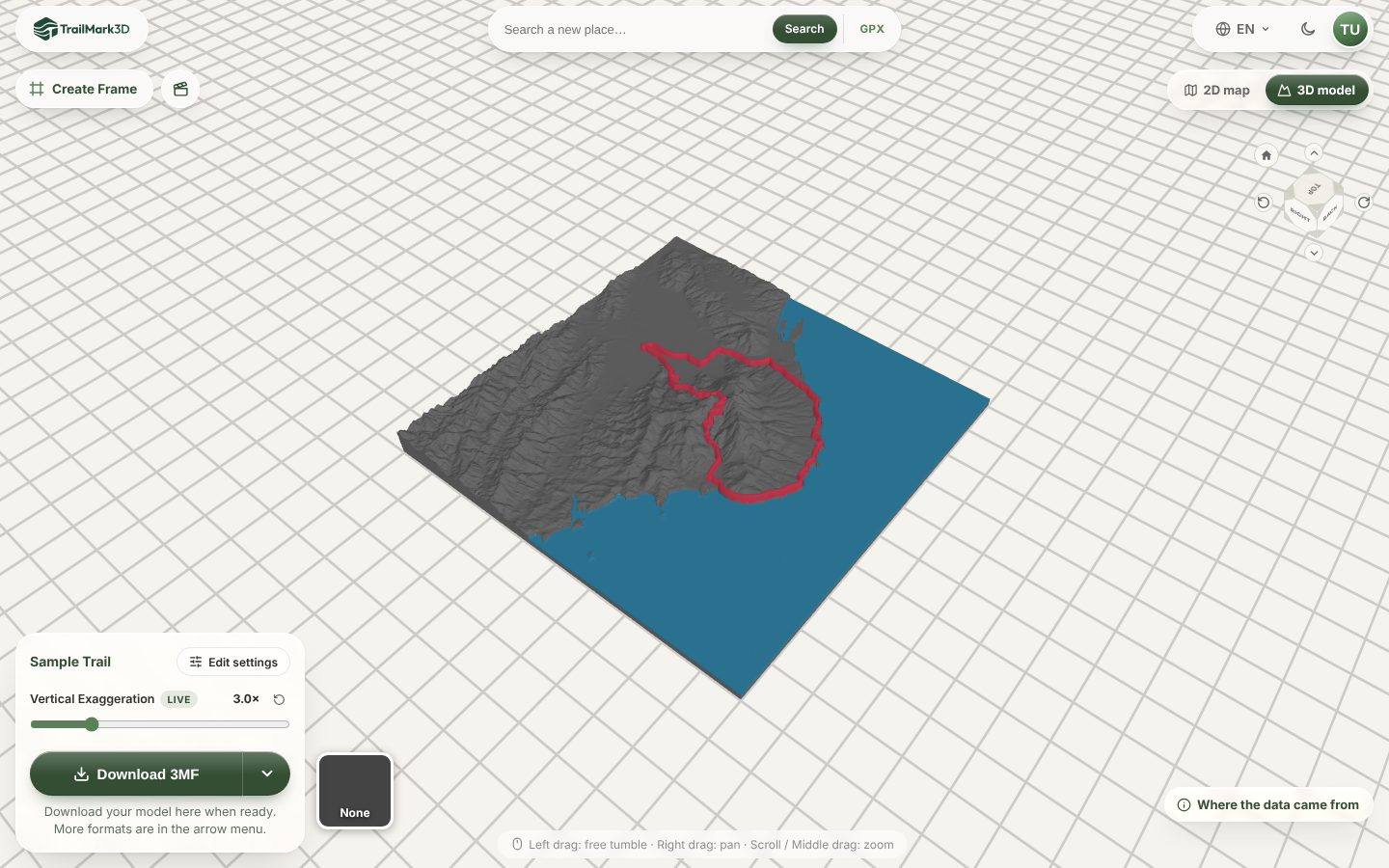
Click Generate 3D Model. When the model is up, try a few exaggerations with the Vertical Exaggeration slider next to the viewer; it changes the model live. Print size, base height and resolution need a new generate. When you like it, download the 3MF or STL. Print it flat, with no supports; STL vs 3MF has slicer settings for terrain.
Frequently asked questions
Is TrailMark3D free?
Yes. The Free plan makes 5 models a day with Standard resolution (250 × 250), the full vertical exaggeration range, any print size from 20 to 250 mm and STL and 3MF downloads for personal use; you need a free account to download. Pro ($10 a month) adds High resolution set from your print size and nozzle, up to 625 × 625, plus unlimited models. See pricing.
What vertical exaggeration should I use for a 3D printed map?
Start at 2× to 3× for hills, 1× to 1.5× for high mountains, and 4× or more for flat places like cities and coasts. Use the live slider after generating to compare, and pick the one where the valleys still read but the peaks don't look like spikes.
How do I calculate vertical exaggeration?
Divide the height you want the relief to print at by its true-scale height. The true-scale height is the elevation range in meters × print size in mm ÷ area width in meters. If 600 m of relief over 5 km prints 12 mm tall at 1× and you want 30 mm, use 30 ÷ 12 = 2.5×.
Why does my terrain map look flat?
Either the area is large compared with its relief, or the exaggeration is low. Zoom the tile in on the part you care about, or raise Vertical Exaggeration. A larger print size makes the relief taller in millimeters, but it keeps the same proportions.
What is grid resolution?
The number of elevation points along each side of the model. 250 × 250 is 62,500 points. More points give sharper ridges and smaller details, up to what your nozzle can print; past that they only make the file bigger.
Does a higher resolution take longer?
Yes, a little: a finer grid makes a bigger mesh and a bigger file. On Pro the grid follows your print size and nozzle, so a smaller print or a wider nozzle builds faster.