3D printed cycling climb: turn Mont Ventoux, the Stelvio or your local climb into a 3D map
Make a 3D print of a famous cycling climb with TrailMark3D. Upload the GPX of the climb, frame the mountain, add the roads, raise your route and put the climb's name and your time on the frame. Includes 11 legendary climbs from Mont Ventoux to Sa Calobra.
In short
Get the climb as a GPX file, from your ride on Strava or Garmin, or from a route you plan on Strava, Komoot or RideWithGPS. Upload it on the TrailMark3D home page and widen the tile so the whole mountain fits. Under Map Features, switch on Roads with only the main roads, set the terrain color, and click Generate 3D Model. The climb is raised in its own color on the mountain. Click Create Frame to add the climb's name, its height and your time, then download the 3MF. It is free with an account for personal use.
Every cyclist has a climb they talk about: the one they trained a whole season for, the bucket-list col from the Tour de France, or the local hill they ride every Sunday. A 3D print of the climb puts it on the desk: the mountain in relief, the road you rode raised in your color, and the climb's name and your time on the frame. TrailMark3D builds it from a GPX file in a few minutes. This guide makes a 3D map of Mont Ventoux from Bédoin, in Provence, France: about 21.5 km and 1,600 m of climbing to the summit at 1,910 m. The table at the end has 10 more legendary climbs.
Open Trail Settings on the sample trail
Get the GPX file of the climb
The best file is your own ride. On Strava, open the activity and choose Export GPX from the three-dot menu; on Garmin Connect, open the activity, click the gear and choose Export to GPX (export a GPX from Strava, Garmin and Komoot shows every step). A whole ride includes the way there and back, so for the climb alone, draw it as a route instead: in the Strava, Komoot or RideWithGPS route planner, click the bottom of the climb and the top, and export the route as GPX. That is also how you make the gift for a climb you haven't ridden yet.
Upload the climb and frame the mountain
Go to the TrailMark3D home page and drop the GPX file on the upload box. The workspace opens with the climb drawn on the map inside a tile that just fits it. Widen the tile so the whole mountain is in the print, not just the road: click the width under the tile and type it, here 15 km, so the summit of Mont Ventoux and its bare white top sit inside the tile with room around them. Keep the start of the climb away from the edge, or the route runs off the side of the print.
Add the roads and set the colors
Open Map Features and switch on Roads. Click Road types, click All off, and switch on the main classes only: Motorway, Trunk, Primary, Secondary and Tertiary. The valley roads and the other routes up the mountain then show as thin black lines, and your climb stands out as the one in color. In the Landcover colors card on the map, click the Terrain swatch and pick a white or a light gray, so the black roads and the red route show clearly. That makes 2 print colors for the terrain and the roads, plus the route, which prints as its own piece.

Open Trail Settings to choose how the route prints: a Raised trail 2 to 3 mm tall, and the Trail Color of your club jersey or your bike.
Generate the 3D model
Open Terrain Detail and set the Vertical Exaggeration: 1.5× to 2× makes a climb of 1,000 m or more look as steep as it felt, and an Alpine pass with tight hairpins reads well at 1.5×. Click Generate 3D Model. The model opens in the 3D viewer with the climb raised in red, from the vineyards at Bédoin, through the forest, to the summit.
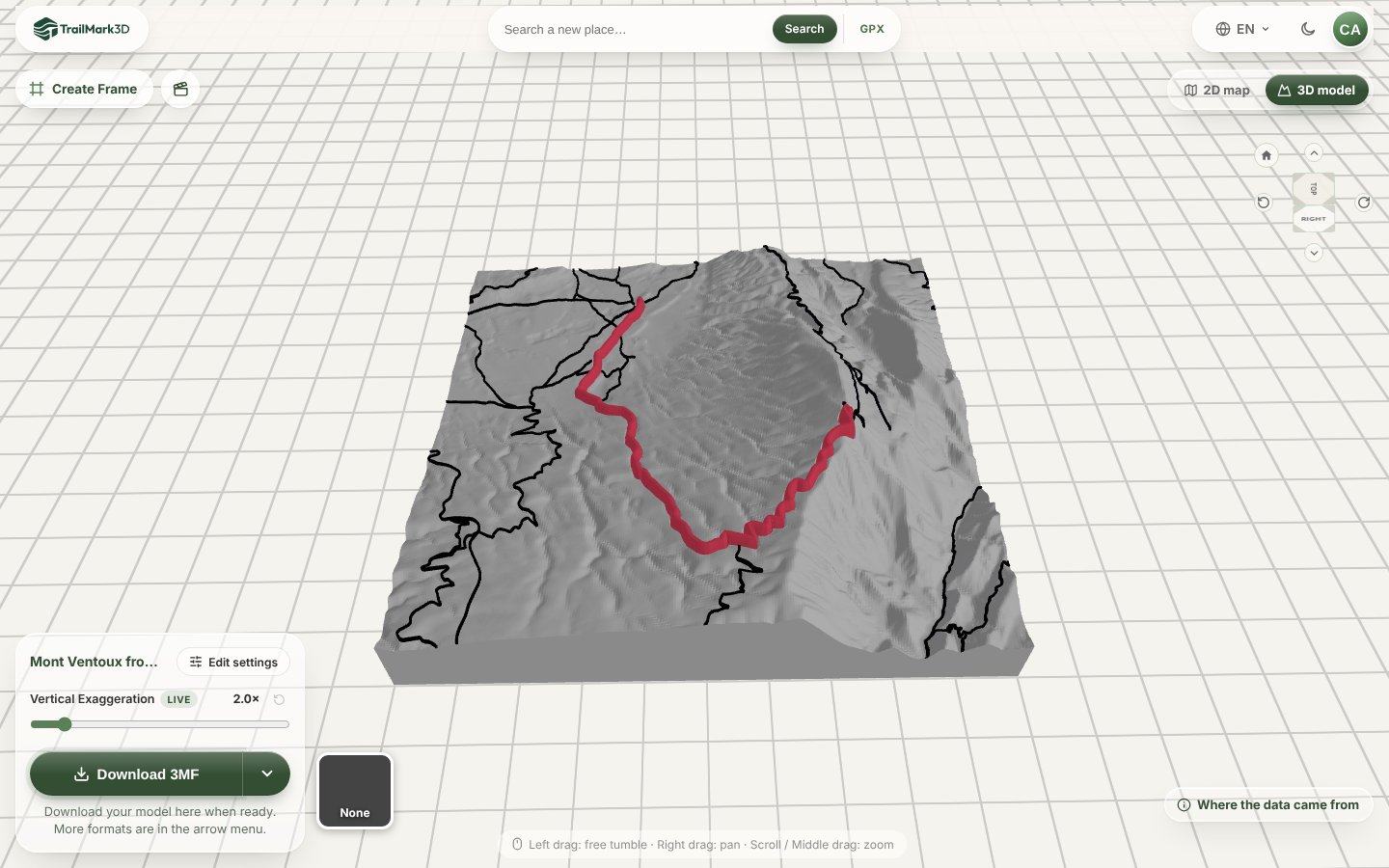
Open Terrain Detail · Open the 3D viewer
Put the climb's name and your time on the frame
Click Create Frame at the top left of the 3D viewer. The Frame Builder opens with a frame sized around your model. Click the front face, choose Add text… and type the climb's name, its height and your time, such as "MONT VENTOUX 1910 M · 1:42:30". Set Size to about 4 mm so it fits the face, and pick the color of the route.
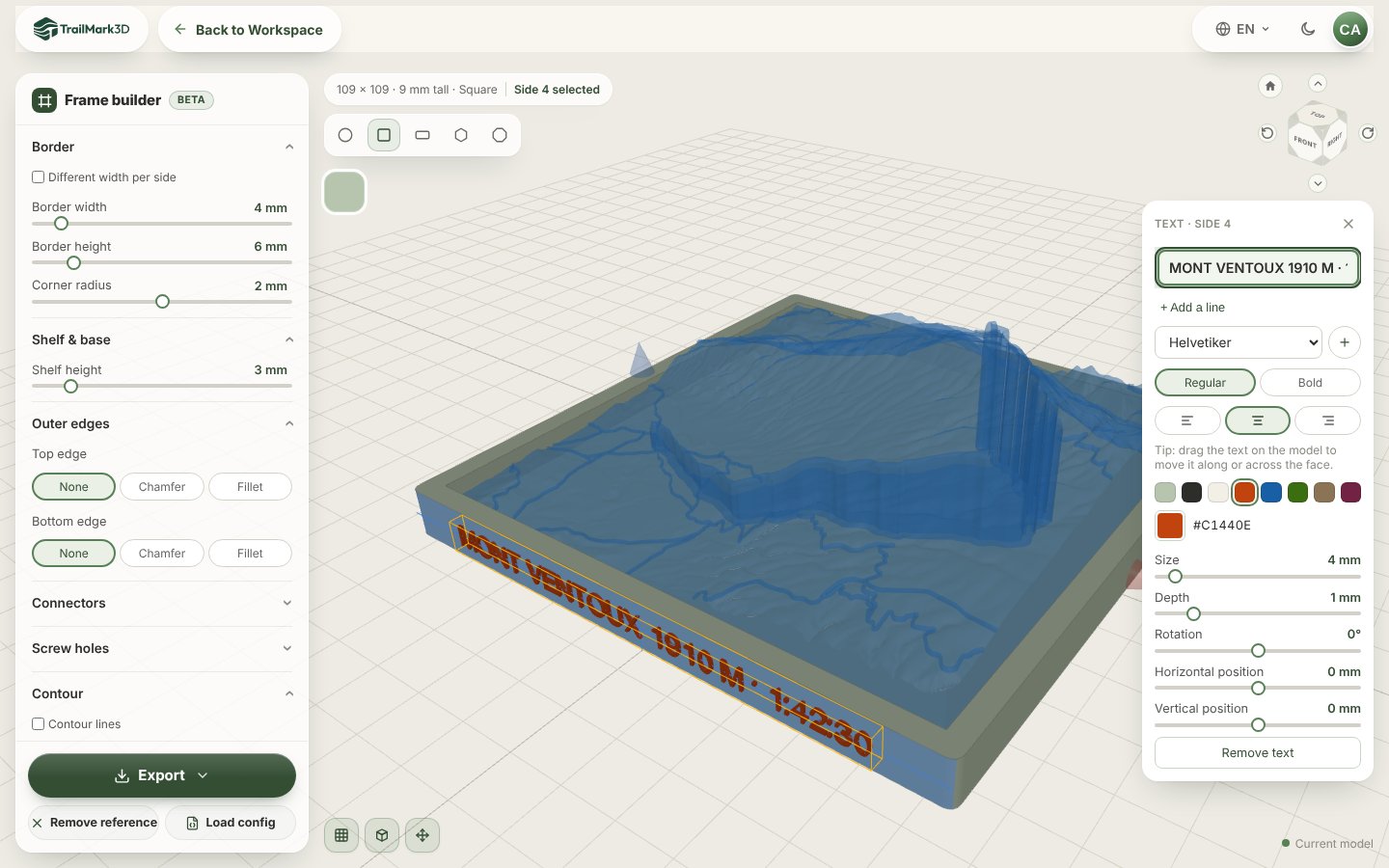
Download and print
Click Download 3MF in the workspace for the model, with the route as its own part, and Export in the Frame Builder for the frame. Print both flat with no supports. A 150 mm model prints in a few hours, so it is ready for a birthday or a club dinner the next day. STL vs 3MF has the slicer settings for terrain.
Legendary cycling climbs to print
Each link opens the climb's mountain in the workspace, with a tile wide enough for the whole climb. Upload your GPX to add the route.
| Climb | Country | Length | Climbing | Tile width |
|---|---|---|---|---|
| Mont Ventoux from Bédoin | France | 21.5 km | 1,600 m | 15 km |
| Alpe d'Huez | France | 13.8 km | 1,070 m | 8 km |
| Col du Tourmalet from Luz-Saint-Sauveur | France | 19 km | 1,400 m | 14 km |
| Col du Galibier from Valloire | France | 18 km | 1,250 m | 14 km |
| Passo dello Stelvio from Prato | Italy | 24.3 km | 1,800 m | 18 km |
| Passo del Mortirolo from Mazzo | Italy | 12.4 km | 1,300 m | 8 km |
| Alto de l'Angliru | Spain | 12.5 km | 1,250 m | 8 km |
| Lagos de Covadonga | Spain | 12.6 km | 900 m | 10 km |
| Sa Calobra, Mallorca | Spain | 9.4 km | 680 m | 6 km |
| Mount Washington Auto Road | USA | 12.2 km | 1,420 m | 10 km |
| Haleakalā from Paia | USA | 57 km | 3,050 m | 40 km |
Frequently asked questions
Is it free?
Yes. With a free account you get 5 models a day, a raised route in its own color, roads and terrain in up to 2 print colors, the Frame Builder with raised text, and STL and 3MF downloads for personal use, so a climb print for yourself or as a gift costs nothing. Pro ($10 a month) adds satellite colors, more print colors, unlimited models and commercial use. See pricing.
Can I 3D print a Strava segment?
Not from the segment itself, because Strava doesn't export segments as GPX. Draw the same stretch as a route in the Strava route planner, or in Komoot or RideWithGPS, and export the route as GPX. Or export your whole activity, upload it, and frame only the climb: the parts of the ride outside the tile are left out.
How do I show how steep the climb is?
Raise the Vertical Exaggeration under Terrain Detail to 2× or more, and keep the tile tight around the mountain. On a long, steady climb such as Mont Ventoux, a 15 km tile at 2× shows the whole rise from the plain to the summit.
Can I print several climbs, like a whole Tour stage?
Yes. Upload the GPX of the stage and widen the tile until every col fits, or print each climb as its own tile and hang them side by side. With Pro, you can upload up to 7 GPX files at once as a multi-day trip, one tile per stage.
What is a good gift for a cyclist who has everything?
A 3D print of their hardest or favorite climb, with their time on the frame. Ask for the GPX of the ride, or draw the climb as a route yourself, and print it in the colors of their club or their bike.
Can I print a climb that isn't famous?
Yes. Any road, gravel track or mountain bike trail works, from your local hill to a dirt road in the Andes. If you have the GPX, TrailMark3D can print it, anywhere in the world.