3D printed race map: turn a marathon or race route into a finisher gift
Turn the GPX of a marathon, trail race, gran fondo or triathlon into a 3D printed race map. Upload the route, raise it in your race color, add the race name and finish time on a frame, and print a finisher keepsake.
In short
Export the race from Strava, Garmin or the organizer's course page as a GPX file and upload it on the TrailMark3D home page. Frame the course on the map, raise the route in a second color under Trail Settings, and click Generate 3D Model. Then click Create Frame to add the race name, the date and the finish time as raised text, and download the STL or 3MF. It is free with an account for personal gifts.
A medal says you finished. A 3D printed race map shows what you finished: every climb, every hairpin and the line you ran or rode, in your hands. TrailMark3D turns the GPX file of a race into a solid terrain model with the course raised on top, and its Frame Builder puts the race name and your finish time on the border. It makes a finisher gift for yourself, a present for a runner or a cyclist, or a keepsake for a whole club. This guide makes one for the climb to Alpe d'Huez in the French Alps, the 21 hairpins that finish La Marmotte gran fondo.
Open Trail Settings on the sample trail
Get the GPX file of the race
You need the course as a GPX file. The best one is your own recording: on Strava, open the activity and choose Export GPX from the three-dot menu; on Garmin Connect, open the activity, click the gear and choose Export to GPX. Export a GPX from Strava, Garmin and Komoot shows each app step by step. Making a gift for someone else? Most races publish the official course as a GPX on their website, and many race routes are saved as Strava or Komoot routes you can export the same way.
Upload the route and frame the course
Go to the TrailMark3D home page and drop the GPX file on the upload box. The workspace opens with the course on the map inside a tile that fits it. Pick the tile shape with the shape button on the left of the map: a hexagon or a circle reads well next to a medal, and a square fits a standard shadow box. Drag the tile to give the start and the finish some room, or rotate it so the course runs along the print. For Alpe d'Huez, a hexagon about 6 km across holds the whole climb from Le Bourg-d'Oisans to the ski station.

Make the route stand out in your race color
Open Trail Settings. Keep Raised trail so the course stands on top of the terrain, and set Trail Height to 2 or 3 mm and Trail Width to about 2 mm, so the line is easy to see and to trace with a finger. Under How it prints, pick On terrain if your printer changes filaments (an AMS or another multi-material system), or Separate to print the route as its own piece in a second color and press it into its slot. Click the Trail Color swatch and pick the race's color: the color of the bib, the jersey or the medal ribbon.
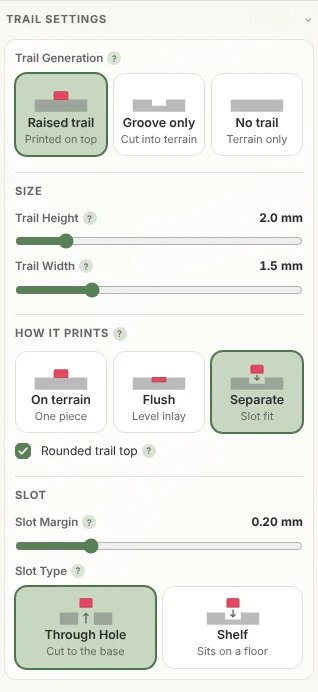
Shape the terrain and generate the model
Open Terrain Detail to set the Print Size (120 to 150 mm suits a desk or a shelf) and the Vertical Exaggeration. A mountain course like this one looks right at 1.2× to 1.5×; a flat city marathon needs 3× or more, or City Mode so the streets and buildings carry the route instead of the hills. Under Map Features, switch on Landcover to color the forests, meadows and rock: Color overlay is free, and Satellite (Pro, used here) takes the colors from real imagery. Switch on Water Bodies too if the course runs along a lake, a river or the sea. Then click Generate 3D Model. The model opens in the 3D viewer: drag to turn it and check that the start, the finish and the climbs read well.
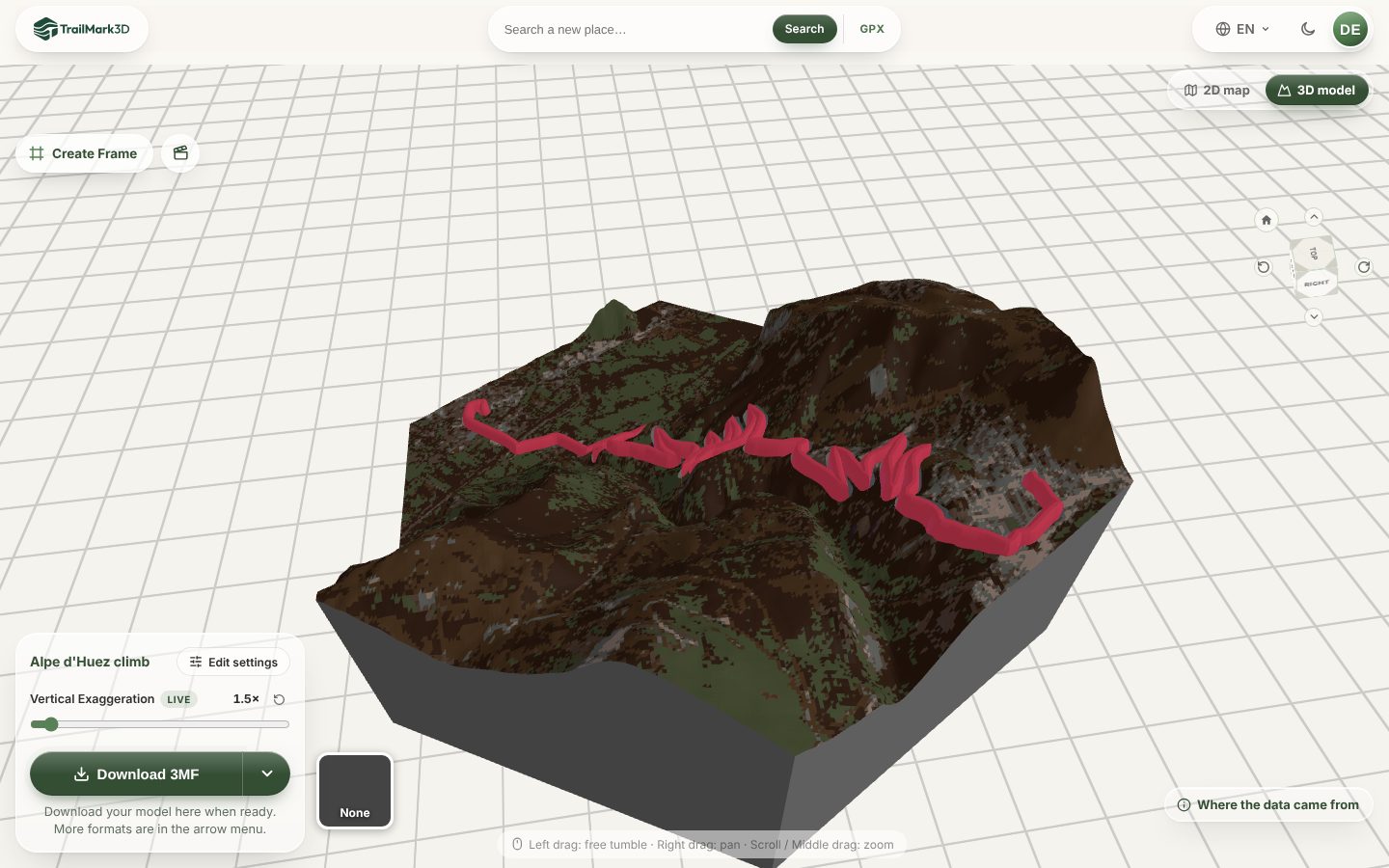
Open Terrain Detail · Open the 3D viewer
Add the race name, date and finish time
This is what turns a map into a finisher gift. Click Create Frame at the top left of the 3D viewer. The Frame Builder opens with a frame already sized around your tile, in the same shape. Click a face of the frame and choose Add text…, type the race name, and pick a text color that matches the route. Set Size to about 4 to 5 mm so the letters fit inside the face; on a frame 9 mm tall, the default 8 mm runs over the edges. Then click the next face and add your finish time, such as "1:02:15", or the date. On a taller border, + Add a line puts both on one face. Under Screw holes, add a hole to hang it on a wall, or leave the back flat to stand it next to the medal. The 3D printed map frame guide covers every frame setting.
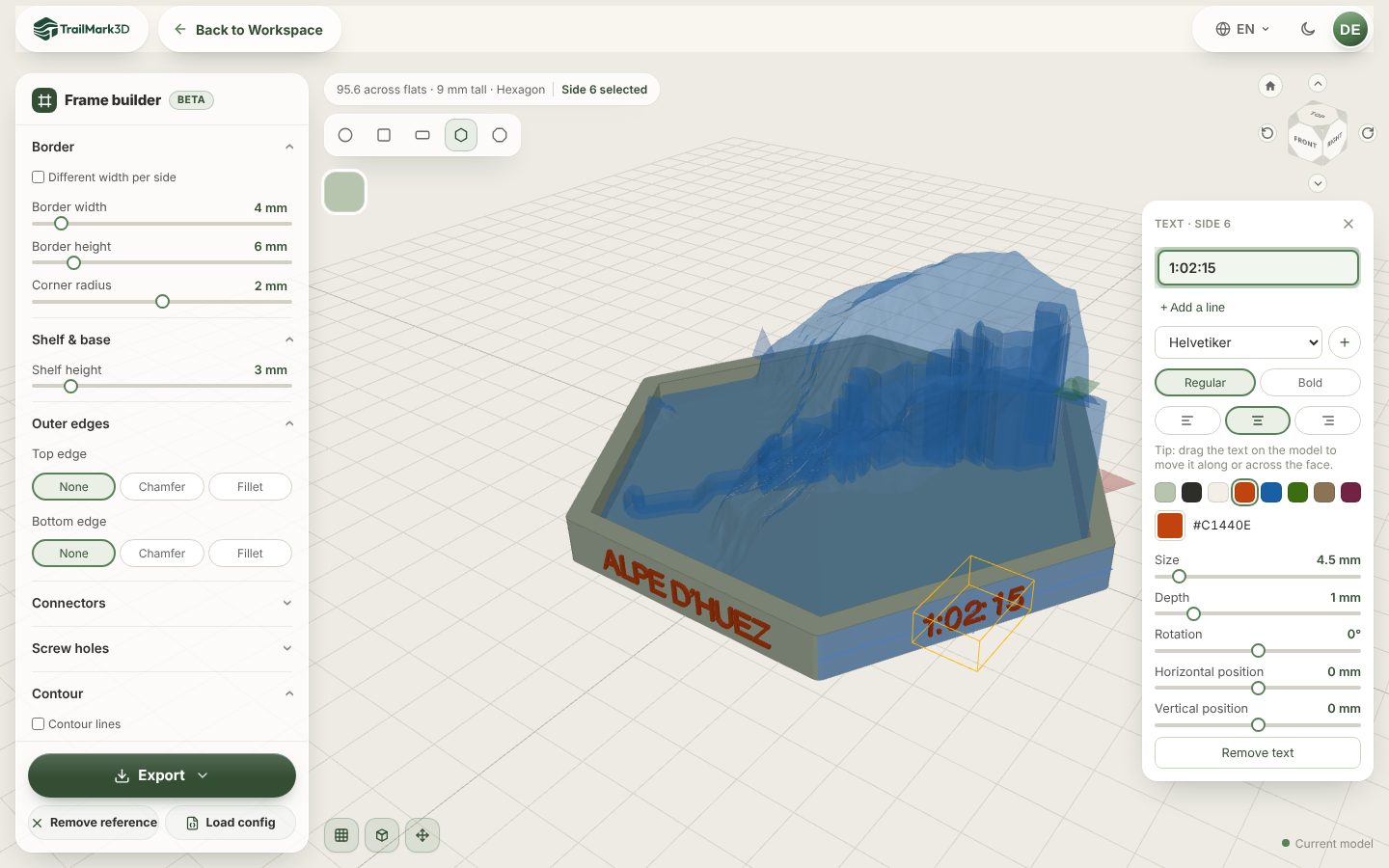
Download, print and give it
Click Download 3MF in the workspace for the tile with the route in its own color, and Export in the Frame Builder for the frame. Print both flat with no supports. A 120 mm tile takes a few hours on most printers, so one evening is enough for a gift ready the next day. STL vs 3MF explains which file to pick and the slicer settings for terrain.
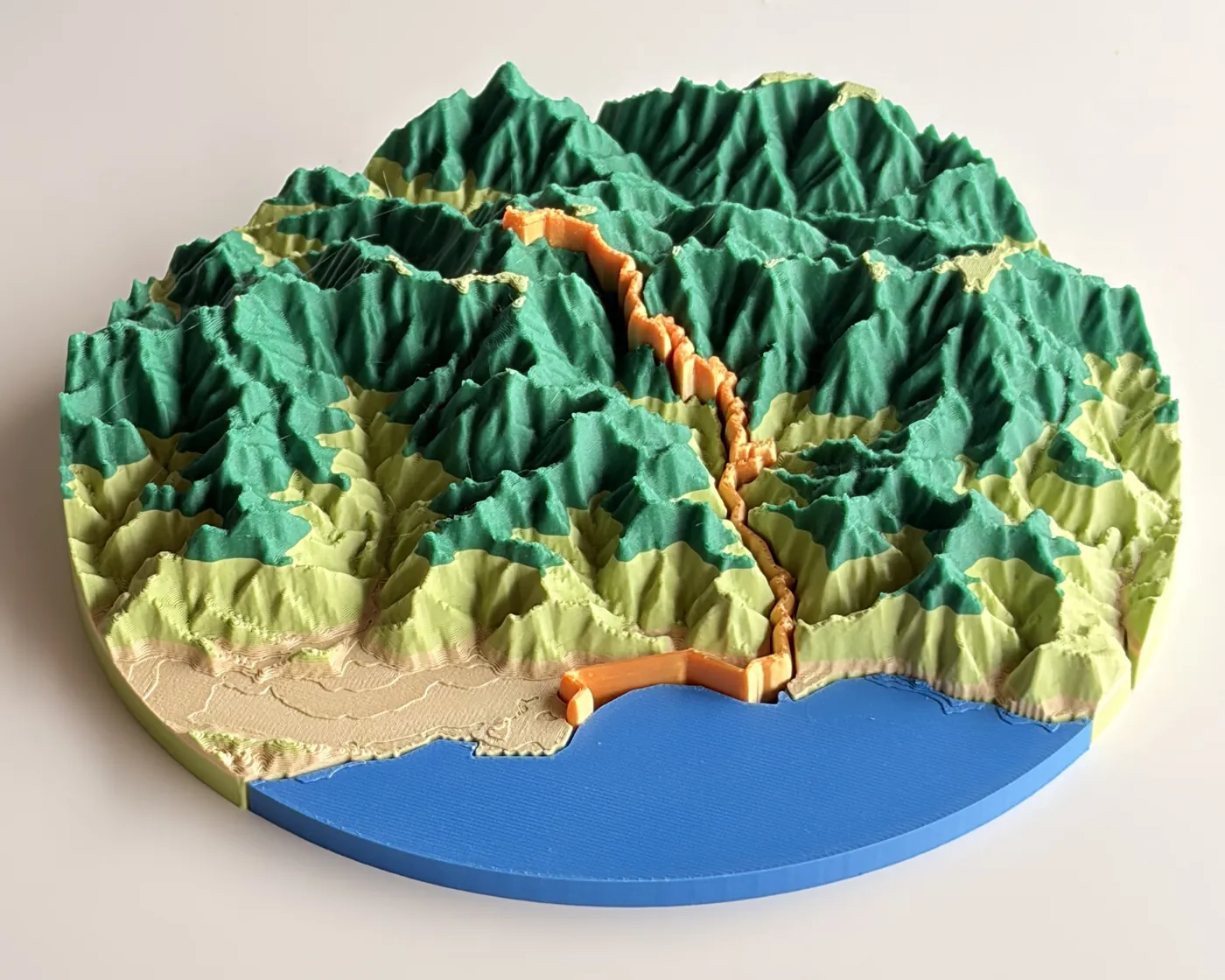
This is a real race print: the Taiwan KOM Challenge, a cycling race that climbs from the sea to 3,275 m. The route is printed as its own orange piece and the sea as a blue one. It is on MakerWorld if you want to see it from every side. Want a video to share with the club as well? Make a flyover video of the same course.
Frequently asked questions
Is it free?
Yes. With a free account you get 5 models a day, the square, circle, hexagon and octagon shapes, a raised route in its own color, the Frame Builder with raised text, and STL and 3MF downloads for personal use, so you can print a race map for yourself or as a gift. Selling prints, for example finisher gifts for a race organizer, needs Pro ($10 a month), which also adds unlimited models, satellite colors and City Mode downloads. See pricing.
Can I make a 3D printed map of a city marathon?
Yes. A city course is flat, so the hills alone won't carry it. Turn on City Mode for the streets and buildings along the route, or raise the Vertical Exaggeration to 3× or more and keep the trail tall, so the course stands out from the city.
Where do I get the GPX file of a race?
From your own watch or app: Strava, Garmin Connect, Coros, Suunto and Wahoo all export a GPX of an activity. For the official course, look on the race website for a GPX download, or for the race's Strava or Komoot route. See Export a GPX from Strava, Garmin and Komoot.
Can I put my finish time on the 3D print?
Yes. Click Create Frame after you generate the model and add text to a face of the frame: the race name, the date and the time, on up to two lines per text block. In a 3MF the text is its own part, so it prints in its own color.
What size should a race map gift be?
120 to 150 mm across fits on a desk or next to a medal, and prints in a few hours. Go to 200 mm or more for a wall piece. A long course, such as a full marathon or a 100 km gran fondo, looks better on a larger print, because every millimeter covers more ground.
Can I make the same gift for every finisher of a club or a race?
Yes. Generate the course once, and save the frame's settings with Config (JSON) in the Frame Builder. For each finisher, load the config, change the name and the time, and export again. Making prints to sell needs Pro.
Can I print a stage race or a triathlon?
Yes. For a triathlon, upload the GPX of the bike leg, or a file with all three legs as separate tracks, and switch on Water Bodies to show the swim. For a stage race over several days, upload each stage as its own model, or join the stage tiles with the frame's Connectors.